File naming conventions
By default, the Design name field will take the current design name – e.g. ‘Design1’. You can change it if you wish. This name is applied to all files exported with the Export Multi-Decoration Files dialog.
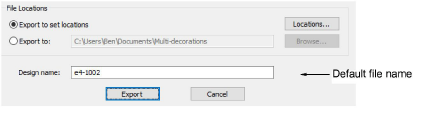
If exported files for any components have the same selected file extension and location, the file name will be automatically suffixed as follows:
| Design Element | Suffix |
|---|---|
| Embroidery | _EMB |
| Graphics | _GFX |
| Appliqué | _APQ |
| Bling | _BLG (for a single file) |
Example
The single multi-decoration file – ‘Design1.EMB’ – contains embroidery, graphic, appliqué, and bling components. Depending on chosen file types, you will see file names of the following kind:
| Design Element | File Type | File Name |
|---|---|---|
| Embroidery | Wilcom EMB | Design1_EMB.EMB |
| Graphic | CorelDRAW | Design1_GFX.CDR |
| Appliqué | AutoCAD | Design1_APQ.DXF |
| Bling | Adobe Illustrator | Design1_BLG.AI |
Bling multi-file output
When bling objects in a design contain rhinestones of different size, shape, and/or color, and the Multiple Files output option is selected in the Settings dialog, files will take a suffix of the following form:
- <filename>SSx<color>
- <filename>SSx<color>_<shape_name>
- <filename><color><shapename><XxY>
For example, consider a design with the following bling types:
| Bling type | Output filename |
|---|---|
| Navette 8 x 4mm with color Emerald | Design1_Emerald_Navette_8x4.PLT |
| Flower SS16 with color Crystal | Design1_SS16_Crystal_Flower.PLT |
| SS04 with color Aquamarine | Design1_SS04_Aquamarine.PLT |
TIP
The print preview shows which rhinestones are in which file.