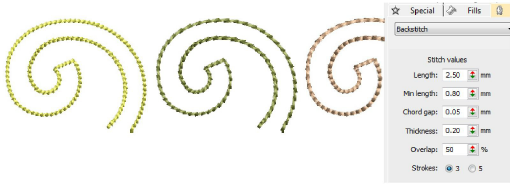
Decorative outlines
 | Use Outline > Backstitch to place a row of backstitches along a digitized line. Right-click for settings. |
|---|---|
 | Use Outline Stitch Types > Backstitch to place a row of backstitches along a digitized line. Right-click for settings. |
 | Use Outline > Stemstitch to place a row of stemstitches along a digitized line. Right-click for settings. |
 | Use Outline Stitch Types > Stemstitch to place a row of stemstitches along a digitized line. Right-click for settings. |
While simple run stitching is typically used to add borders and pickout runs, there are stitch types for creating decorative outlines. Backstitch is an older-style, adaptable stitch which can be used for delicate outlines. Stemstitch is thicker and can be used to mimic hand-sewn embroidery. Digitize decorative outlines as you would a Run stitch outline. Adjust settings with the Object Properties > Outlines tab.