Revert to the NORMAL template
If you modify the NORMAL template supplied with EmbroideryStudio, you can revert to the original version. A factory copy is always maintained so that the NORMAL template can be restored.
To revert to the NORMAL template...
Close EmbroideryStudio.
Click the MS Windows® Start button and navigate to the Wilcom EmbroideryStudio group.
Select Revert. The Revert to Factory Settings dialog opens.
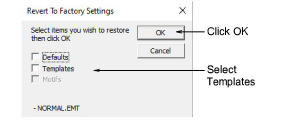
- Select the Templates checkbox and click OK. The original settings for the NORMAL template are restored.