Assign thread colors
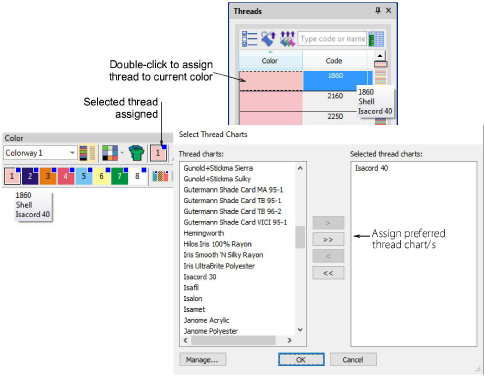
 | Use Color > Threads to search for and match threads from different charts, and assign for use. |
|---|---|
 | Use Color > Colorway Editor to assign thread colors to slots in the color palette. |
 | Use Threads > Select Thread Charts to select the thread chart/s you currently have available for use. |
 | Use Threads > Assign Thread to assign selected thread to the current color slot in the color palette. |
 | Use Threads > Match All to match threads from the current chart/s to all color slots in the current colorway. |
The supplied charts represent the brands of threads that EmbroideryStudio supports. Each chart includes a range of thread colors together with code, brand and description. You can search for a thread by code or description and assign it to a selected design color slot. Alternatively, let the software match design colors to threads in the current thread chart/s.
Thread charts are lists of predefined thread colors. They may be based on commercially available thread charts, or charts you define yourself. When you create a thread chart, you are creating a store of colors for future use. You may also want to update existing thread charts by modifying thread details or removing threads.