Apply automatic kerning
 | Right-click Toolbox > Lettering to adjust automatic kerning for selected lettering objects. |
|---|
The automatic kerning option is accessed by means of the Object Properties docker.
To apply automatic kerning...
- Double-click a lettering object to access object properties.
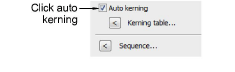
Scroll down to the Spacing panel. If a kerning table exists for the selected embroidery font or TrueType font, the Auto Kerning checkbox is enabled and selected by default.
Select Auto Kerning as required and click Apply.