Modify styles
The Setup > Manage Styles function allows you to modify styles, including the factory presets in the NORMAL template. You can merge settings from one style to another. You can rename a style without affecting its settings. You can also remove any unwanted styles from a template.
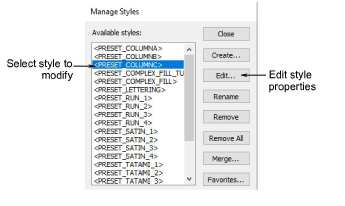
Select a style from the list and modify using the available buttons:
| Function | Description |
|---|---|
| Edit | Edit styles as you would a selected object. See Change current settings for details. |
| Rename | Rename a style at any time. Select names that will help you remember the style or help you sort frequently-used styles to the top of the list. |
| Remove / All | Remove unwanted styles from the current template. The style is removed from the list of style names. To remove all styles from a template click Remove All. |
| Merge | Copy settings from one style to another via the Merge With Style dialog. When you merge, settings from the second style overwrite the first. |
| Favorites | You can assign up to ten favorite styles to tool icons on the Styles toolbar. See Assign favorites for details. |
TIP
At some stage, you may want to revert to the original style settings in the NORMAL template. See Revert to the NORMAL template for details.